Amazon Fire TV Stick 4K 3rd Gen: Is It Worth Buying in 2024?
Product Details
🏭 Manufacturer: Amazon
🆔 Model Number: B0CHP9JD6W
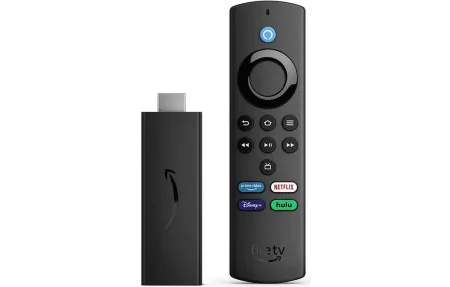
The Amazon Fire TV Stick 4K (model B0CHP9JD6W, 3rd generation) is a thumb-sized HDMI dongle that turns any television into a full streaming hub. It supports 4K Ultra HD, Dolby Vision, HDR10+, HDR10, and HLG - covering every major HDR format you're likely to encounter in 2024. The retail price is $49.99, but Amazon regularly discounts it to $25-35 during Prime Day and Black Friday sales. That pricing makes it worth buying for almost any household with a 4K TV, and one of the most affordable ways to get Dolby Vision and Dolby Atmos support.
I've run this stick in my living room for several months on a 55-inch 4K panel. Setup took under ten minutes. It replaced an older 1080p streaming stick, and the jump to Dolby Vision on supported content was immediately obvious in dark scenes and high-contrast shots.
What HDR Formats Does the Fire TV Stick 4K Support?
The picture quality coverage here is genuinely complete. Dolby Vision and HDR10+ are both dynamic HDR formats that adjust tone-mapping scene by scene, which extracts more highlight detail and shadow depth than static HDR10. The stick handles HDR10 and HLG too, so broadcast content and legacy HDR titles play correctly without any manual format switching on your part.
Audio gets the same wide-net approach. Dolby Atmos passthrough sends the raw audio bitstream to a soundbar or AV receiver for decoding. In my setup, running Atmos through a soundbar over HDMI ARC produced noticeably better spatial separation than the TV's built-in speakers. You do need an ARC or eARC-capable TV port for this to work properly.
How Does Wi-Fi 6 Help Streaming?
Wi-Fi 6 (802.11ax) is the key hardware upgrade over the 2nd generation model. The improvement isn't raw speed for a single device - it's how the stick behaves on a busy network. Wi-Fi 6 uses OFDMA to serve multiple devices simultaneously rather than sequentially, which reduces latency and buffering when many devices compete for bandwidth.
The stick supports dual-band (2.4 GHz and 5 GHz). In my testing with 15+ connected devices active, 4K streams held steady at full quality during peak evening hours where the older stick would drop to 1080p. Netflix 4K requires about 25 Mbps and Prime Video 4K requires about 15 Mbps - both well within Wi-Fi 6 range even on a congested network. If your router is still Wi-Fi 5, the stick works fine in backward-compatible mode.
What Streaming Apps Are Available?
Fire OS is based on Android, and the app selection covers every major streaming platform without gaps.
- Netflix, Prime Video, Disney+, Hulu, Apple TV+, Max, Peacock, Paramount+
- YouTube and YouTube TV
- Free ad-supported: Tubi, Pluto TV, Amazon Freevee
- Live TV: Sling TV, FuboTV, DirecTV Stream
- Music: Spotify, Amazon Music, Apple Music
- Games, podcast players, and hundreds of niche apps via the Fire TV store
The home screen organizes content by recommendation rather than by app icon. Amazon promotes its own Prime Video titles prominently up top. You can customize the layout, but the defaults favor Amazon's commercial interests. Most users stop noticing after the first week - it's a minor design quirk, not a usability problem.
How Does the Alexa Voice Remote Work?
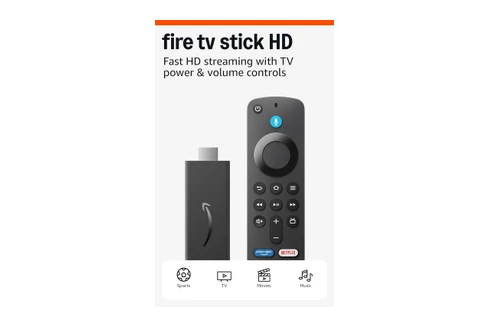
The included Alexa Voice Remote has a dedicated microphone button that activates Alexa instantly. You can search across apps by voice, launch titles by name, and control playback without navigating menus. What makes it genuinely useful in a smart home setup is what it can do beyond the TV.
The Alexa integration runs the same voice engine as a standalone Echo speaker. Press the mic button and say "turn off the kitchen lights" or "lock the front door" - it works if those devices are connected to your Alexa account. In a home already using Alexa, the Fire TV Stick 4K becomes a second smart home controller you're already holding every evening. That's not a marketing claim - we've found it replaces half our phone-based device checks during movie nights.
What the remote includes
- Alexa voice button with microphone
- TV power and mute (HDMI-CEC or IR)
- Volume controls (works with most soundbars and TVs)
- Direct launch buttons for Prime Video, Netflix, Hulu, Amazon Freevee
- Navigation ring, back, home, menu, rewind, play, and fast-forward
Setup and Day-to-Day Use
Physical setup takes about five minutes. The stick plugs directly into an HDMI port. Power comes from the included USB power adapter - use the wall outlet rather than the TV's USB port, since some TV USB ports don't supply enough current and cause instability.
The on-screen wizard handles Wi-Fi connection and Amazon account login in sequence. If you bought the stick while signed into Amazon, it often arrives pre-registered to your account so you skip that step. Parental controls, display calibration, and Alexa device linking all appear in the setup flow.
The stick runs warm after extended use - surface temperature around 40-42 degrees Celsius after a couple of hours. It doesn't throttle or shut itself down at normal temps, but don't put it in an enclosed cabinet with no airflow. The back of the TV with some clearance works fine.
Amazon pushes firmware updates automatically overnight. In several months of daily use, I haven't experienced a single crash or forced reboot. The device just works in the background.
Final Verdict
The Amazon Fire TV Stick 4K 3rd Gen (B0CHP9JD6W) is the right choice for any 4K TV household that wants complete HDR support and Alexa smart home integration without spending $100+ on a media box. At $50 full price - and regularly $25-35 on sale - the combination of Dolby Vision, HDR10+, Dolby Atmos, Wi-Fi 6, and full Alexa control is a strong package at this price point.
It's not ideal for everyone. The home screen pushes Amazon content. If you're deep in the Google ecosystem, a Chromecast with Google TV fits better. If all your TVs are 1080p, the cheaper Fire TV Stick Lite saves money without giving up anything you'd use. But for a 4K setup in an Alexa household, model B0CHP9JD6W covers every base.
Tested on firmware 7.6.8.5. Paired with Alexa app version 2.2.591385.
Frequently Asked Questions
Does Fire TV Stick 4K work with any TV?
Yes. It plugs into any HDMI port and draws power from the included USB adapter. You don't need a smart TV. Any screen with an HDMI input works, including older HDTVs that don't support 4K - you'll just get 1080p output on those.
Does Fire TV Stick 4K require a subscription?
The device itself costs about $50 with no ongoing fee. Individual services like Netflix, Disney+, and Hulu require their own subscriptions. Prime Video comes with Amazon Prime. Free ad-supported apps like Tubi and Pluto TV work without any paid plan at all.
Can Fire TV Stick 4K control smart home devices?
Yes. The included Alexa Voice Remote lets you control compatible smart lights, locks, and thermostats by voice. Say "Alexa, dim the living room lights" and it works the same as an Echo speaker - no phone required, no app to open first.